A Synthesized LowFER Transmitter With Built-In Keyer
by
Lyle Koehler, KØLR
Since Bill de Carle, VE2IQ published his multi-mode beacon keyer circuit in
The LOWDOWN, I’ve incorporated variations of his design into several homebrew
projects. Details of the VE2IQ keyer are found on Bill's web page. This article
describes a complete 1-watt LowFER transmitter that can be built on a single 4
by 6 inch board containing a frequency synthesizer, clock reference, keyer and
final amplifier. The synthesizer tunes in 100-Hz steps from 130 to 190 kHz, and
the built-in identifier provides both Binary Phase-Shift Keying (BPSK) and CW
operation.
Additions and corrections since first publication: Besides the other corrections noted in
the text, I discovered that R13, a 180 ohm resistor was omitted
from the parts list. Also, thanks to Don, W2MPK and Jack, K2JDD who caught an
error in the original schematic of the synthesizer, keyer and modulator.
Resistor R9 should have been connected to pin 4 of U3 rather than to pin 3. The
schematic in this article now shows the proper connection point, and the circuit
board layout was correct.
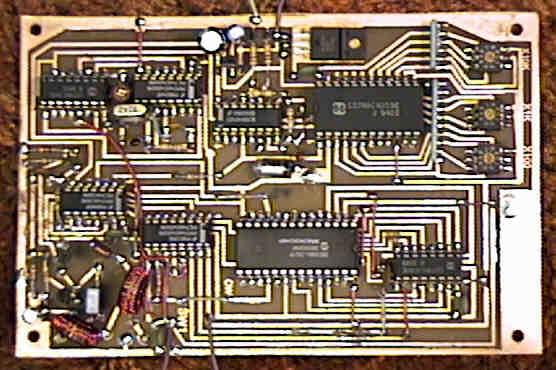
Figure 1 shows a prototype of the “all-in-one” transmitter, built on a
printed circuit board (PCB) that was made with an "iron-on" technique that will
be described later. The rotary DIP switches that set the frequency are located
in the upper right corner of the board, and the final amplifier (including an
output low-pass filter) is in the lower left. In this picture, taken before I
had a high-resolution digital camera, it looks like the circuit board extends
beyond the shiny outer rectangle of copper, but that is simply because the
background is about the same color as the etched portion of the board.
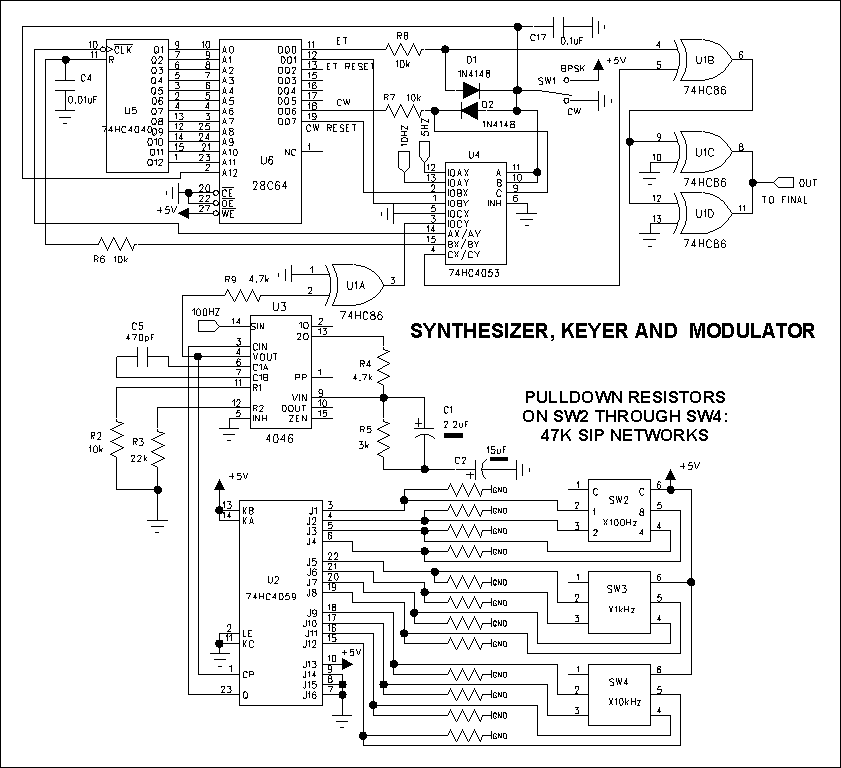
The schematic is shown below and is broken into four blocks. The first block
contains the phase locked loop (PLL) synthesizer, EEPROM-based identifier, and
BPSK/CW modulator. A 4046 CMOS PLL chip is used to generate the carrier
frequency and is programmable by means of miniature binary-coded decimal (BCD)
rotary switches mounted on the PC board. The PLL is the part of the circuit that
can give the most headaches; not because there is anything exotic about the
circuit, but because there seems to be a lot of variation between chips from
different manufacturers. Max Carter had warned in previous articles in the
LOWDOWN that only the 4046 and 74HC4046 chips manufactured by National
Semiconductor can be depended upon to have relatively low phase noise. My own
tests on chips from several sources have confirmed this. Unfortunately, Digi-Key
no longer carries National CMOS parts, and a visit to the National web page
shows that they no longer list any CMOS devices. Bummer! However, I used a
Fairchild 4046 from Digi-Key in the prototype, and although it sounds pretty bad
if you listen to a harmonic in the HF region, it is stable enough on LF for BPSK
operation. Bruce, W0BK has used the prototype board on his BK beacon from Shell
Lake, WI, and has been copied in BPSK mode by Bill Bowers in Oklahoma and Bill
de Carle in Quebec. The other thing about PLL chips is that they may not cover
the desired tuning range with the component values shown in my diagram. There
are two easy ways to check the tuning range. If you have a frequency counter,
connect it to pin 3 of U1A and attach a test lead to pin 9 of the 4046 (U3).
When the test lead is tied to the +5 volt line (pin 16 of U3), the voltage
controlled oscillator (VCO) in the 4046 will be tuned to the high end of its
frequency range, and with the test lead grounded, the VCO is tuned to its lowest
frequency. These limits must be a few kilohertz beyond the ends of the desired
tuning range for reliable operation. If you don’t have a frequency counter,
connect a very high impedance voltmeter or oscilloscope probe to pin 9 of U3 and
set the BCD switches to the lowest desired frequency, for example 130 kHz. The
voltage on pin 9 should be at least 0.5 volts above ground. With the BCD
switches set to 190 kHz, the voltage on pin 9 should be no higher than about 4.5
volts. Use a larger value for C5 to lower the frequency of the PLL and a smaller
value to raise it. If a 74HC4046 is substituted for the CD4046, C5 needs to be
considerably larger than the 470 pF shown in the diagram; probably around 1500
pF.
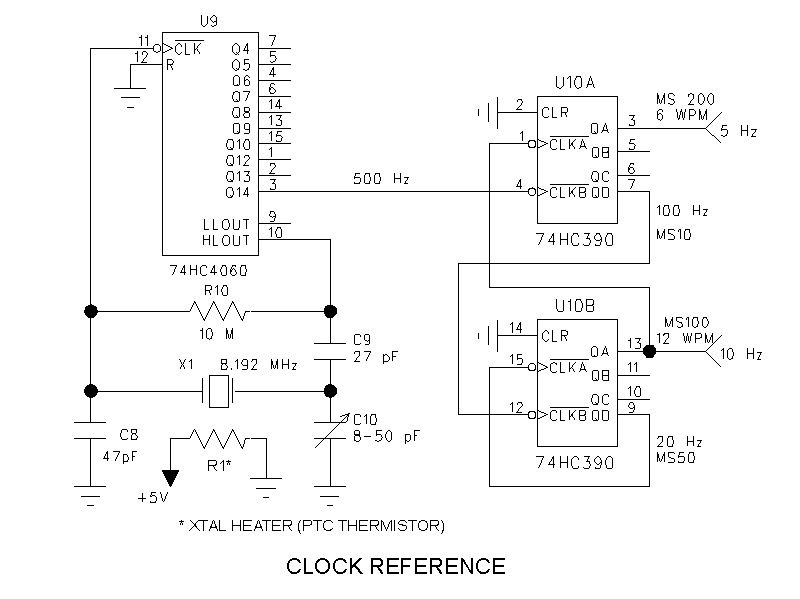
An inexpensive microprocessor crystal is used in the clock reference circuit
shown below, with a positive temperature coefficient (PTC) thermistor attached
to the crystal to improve the frequency stability. The PTC thermistor serves as
both heater and sensor. It isn't necessary to include the thermistor if the
transmitter will be operated only in CW mode, but I strongly recommend it for
BPSK work. The preferred method for attaching the thermistor to the crystal is
to carefully tin one side of the metal crystal can, then carefully
unsolder the lead from one side of the thermistor and carefully solder
that side to the crystal can. A thin wire is run from one side of the crystal
can to ground; the remaining lead of the thermistor is connected to the +5 volt
supply. An alternative to soldering the heater to the crystal is to leave the
thermistor leads intact and attach it to the crystal can with epoxy, duct tape
or your favorite adhesive. I also recommend making a tiny "mitten" out of thin
foam packing material and Scotch tape, and slipping it over the crystal/heater
combination to form a miniature crystal oven. Not all 8.192 MHz crystals will
tune to exactly the right frequency in this circuit, although you're fairly safe
if you use the one from radioshack.com that is specified in the parts list.
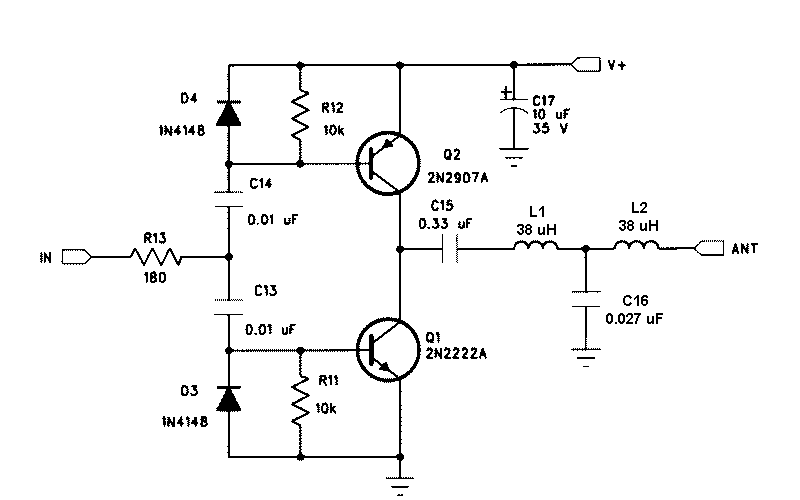
Those who have seen my article on a "Simple LowFER Transmitter" will
recognize the complementary-pair final amplifier circuit below. Small-signal
plastic transistors are normally adequate for 1-watt operation, and the ones
specified in the parts list should work just fine. However, they are
likely to get hot if the antenna is not tuned to resonance (or disconnected).
Unlike some other final amplifier circuits, this one is not likely to
self-destruct under a badly mismatched load condition, especially if a power
limiting circuit is used. Larger transistors like an NTE128/NTE129 pair can also
be used in the final amplifier to reduce the probability of overheating (and
possibly give better efficiency.)
Final Amplifier
The output filter in this final amplifier circuit differs slightly from the
one in my Simple LowFER Transmitter article, in that it is designed to work into
a 30 ohm load rather than 50 ohms. This represents a better compromise for most
LowFER antennas, since the actual feed impedance of a really good LowFER
antenna will be around 10 ohms, and a more typical antenna might have an
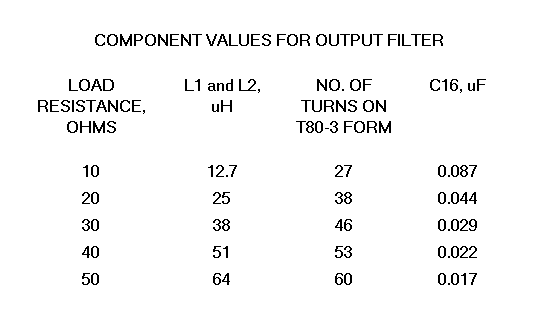
impedance of 25 or 30 ohms. L1 and L2 are two separate coils, each wound with 46
turns of #26 AWG enameled magnet wire on T80-3 (grey) toroid forms. For other
values of load impedance, use the values shown in the table below. Unless you're
a real purist, component values for the filter are not critical because a
typical LowFER antenna is not a fixed, purely resistive load, and tuning the
antenna for maximum output corrects for any "mismatch" in the filter. L1 and L2
can be wound on T50-3, T68-3 or T80-3 forms, and C16 can use the nearest
standard capacitor value.
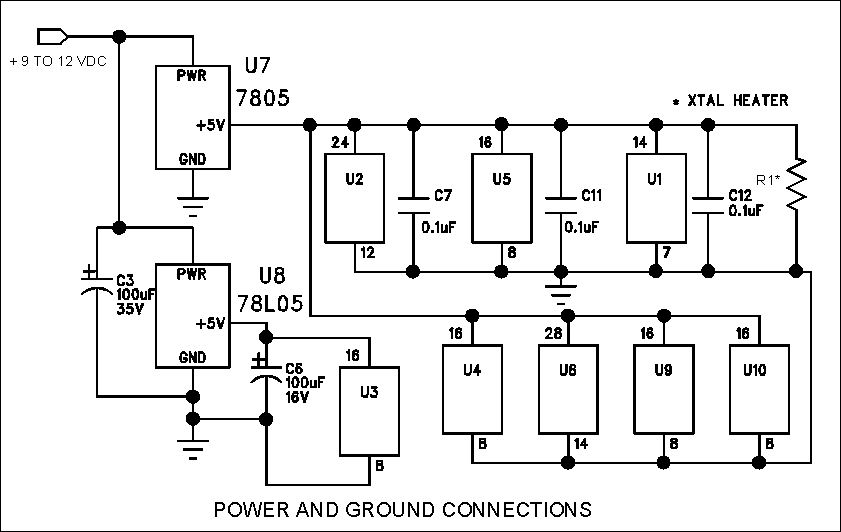
Two 5-volt regulators are used in the supply line in order to
minimize voltage fluctuations on the 4046 PLL chip when the transmitter is
keyed. This may not be absolutely necessary, because there is little change in
the load on the 5-volt regulator during BPSK operation, and the amount of
"chirp" on the CW signal would probably not be objectionable. However, it is
good design practice to isolate the PLL circuit as thoroughly as possible from
either RF or DC influences. Power distribution on the PC board layout is
indicated in the diagram below.
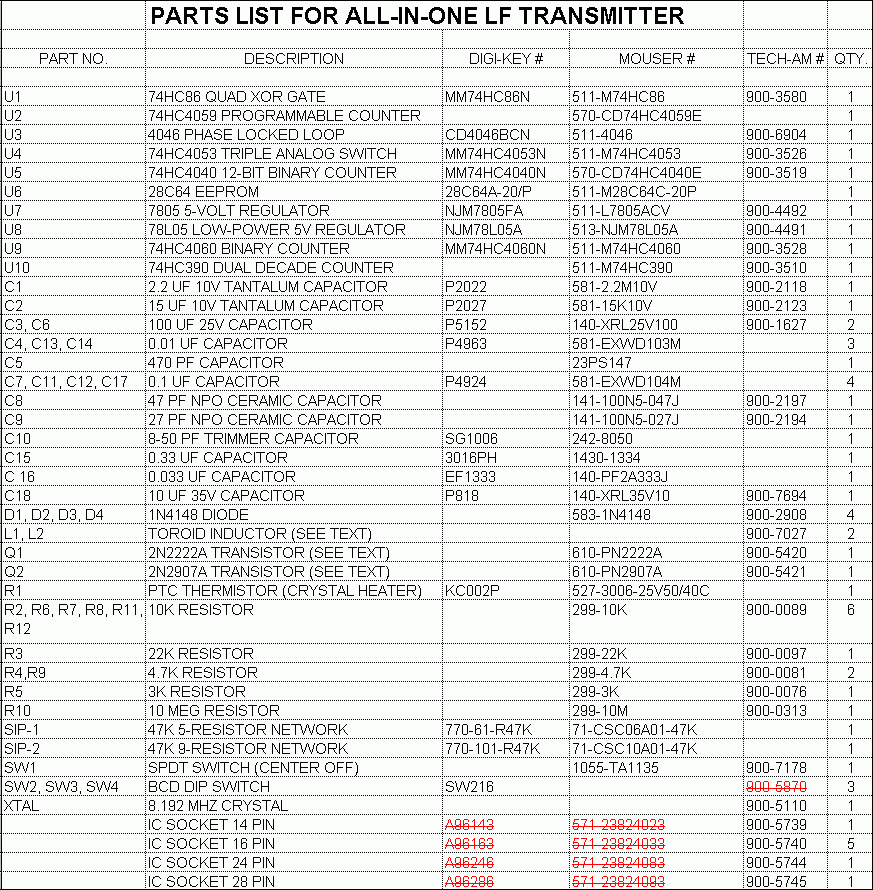
One frustration in homebrew projects is that it is seldom possible to buy all
the parts from one or two suppliers, so that you're stuck with minimum order
and/or shipping charges from several vendors. This project is no exception. When
I first built the all-in-one prototype, I was able to keep it down to two
suppliers -- Mouser and RadioShack.com (formerly TechAmerica). If something was
out of stock, Digi-Key was there as a backup. The parts list below shows catalog
numbers that were correct as of some time in 1999, and most of those numbers
should still be valid. Unfortunately, Mouser has stopped carrying the 74HC4059
programmable counter, and the part isn't in the recent Digi-Key or
RadioShack.com catalogs either. At last report the CD4059, which can be used in
place of the 74HC4059 in this circuit, was available from www.jameco.com as part
number 13143.
Recently (July 2000), while trying to order parts for additional copies of
the synthesized LowFER transmitter, I discovered two other problems. First, the
RadioShack.com BCD DIP switch (RS part number 900-5870) that was shown on the
original parts list has a completely different pinout than the Digi-Key switch
(No. SW216) I used in the prototype. There is no easy modification to the
circuit board that will allow substitution of the Radio Shack switch. Second,
AMP has discontinued the surface mount DIP sockets and they are no longer
stocked by either Digi-Key or Mouser. Acceptable substitutes are the inexpensive
leaf-spring type of IC sockets, but you have to use a needle nose pliers or
other type of tool to bend the pins into an "L" shape. High-quality sockets with
machined pins won't work because you can't bend the pins at all. Of course,
another alternative is to dispense with the IC sockets and bend the IC pins for
direct soldering to the PC board. A revised parts list is shown below with the
deleted items shown in red. Suggested part numbers for the RadioShack.com IC
sockets have been added to the original list.
This circuit can be built using conventional point-to-point wiring, or even
on a plug-in protoboard, but the number of interconnections required will make
it a fairly tedious task with lots of possibilities for errors. There is also
likely to be a lot of "hash" from the digital circuits and the final amplifier,
which is likely to get into the PLL circuit. I recommend using a two-sided PC
board, with all of the copper left on one side to serve as a ground plane, and
with the parts surface mounted on the other side. Making your own PC board,
especially one of this complexity, can be a little daunting, but it is possible
to do it at home with a minimal investment in equipment. An article entitled
"Ironing Out Your Own Printed Circuit Boards" by John Grebenkemper in the July
1993 QST gives the details on how to do it. As the name implies, the technique
uses an ordinary household iron to transfer the toner from a laser printout or
plain-paper copy of the PCB layout to the copper plating on the circuit board.
Actually the toner sticks to the circuit board and the paper stays stuck to the
toner, so it's necessary to soak it all in a weak household bleach solution for
a few hours to break down the paper. Then the paper is washed off, leaving the
toner as a "resist" that keeps the etching solution from attacking the copper in
the areas of the traces and pads on the circuit board. Ferric chloride etching
solution can be purchased from the local Radio Shack store. There are some
commercial iron-on films that can be peeled off as soon as they cool,
eliminating the time and mess involved in dissolving away the paper. However,
the stuff I've tried tends to peel off areas of toner at the same time, which
requires a lot of touching up with a Sharpie or other permanent marking pen.
Epson photo quality inkjet paper seems to work better than the commercial films
I've tried, and can be washed off after soaking it in warm soapy water. Note:
the inkjet paper works fine, but it can't be printed on an inkjet printer; it
has to be done on a laser printer or copier. Large areas of copper (including
the unetched back side of the board) can be protected from etching with masking
tape or clear plastic package sealing tape.
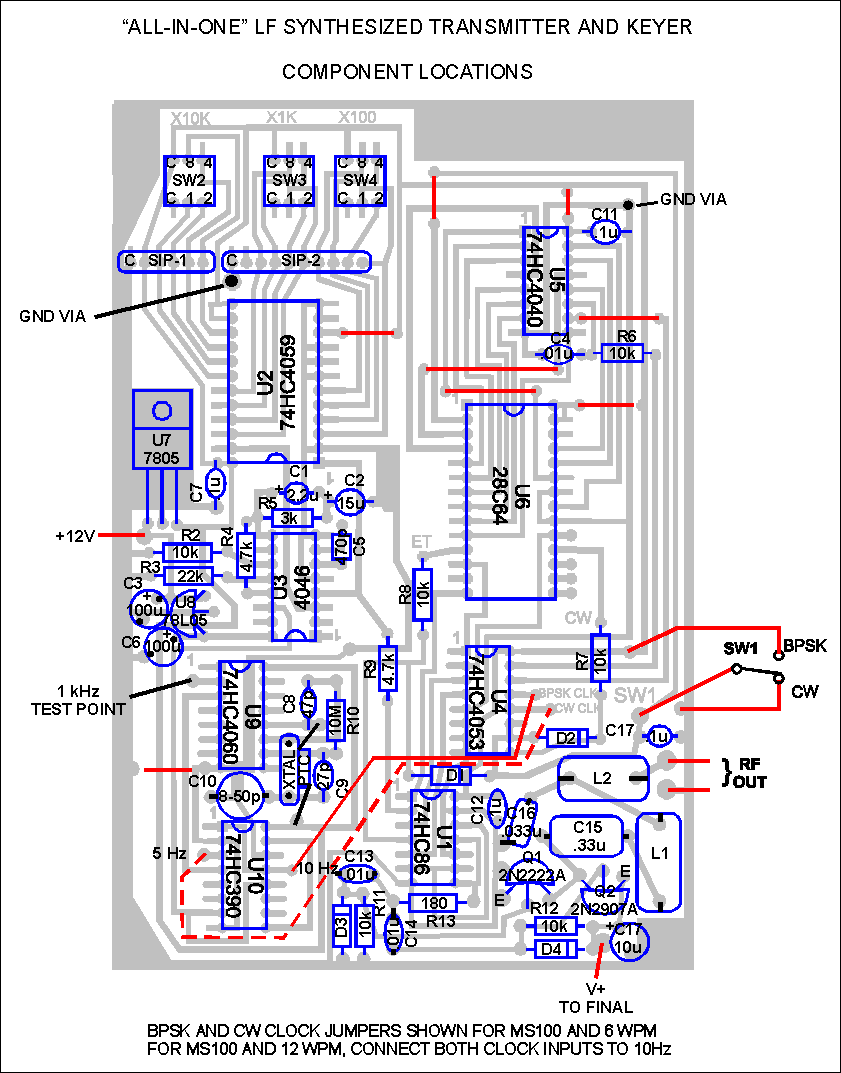
A composite sketch of the circuit board showing the traces, component
locations and necessary wire jumpers is included below. Observe the component
orientations carefully because some of the integrated circuits are installed
"backwards" from the rest in order to simplify the interconnections. Red lines
on the layout indicate where external wires or jumpers are required. The BPSK
clock jumper is shown connected to the 10 Hz output of clock divider U10, which
is the position for MS100 (10 baud) BPSK. A dashed red line is shown connecting
the CW clock to the 5 Hz output of U10. This gives a CW keying speed of 6 WPM. I
personally prefer 12 WPM for my beacon keying speed, which requires a 10 Hz
clock signal, and which can be achieved by leaving out the dashed red jumper and
connecting the "BPSK CLK" and "CW CLK" pads together. An external switch SW1
selects either the BPSK or CW mode by applying either +5 volts (BPSK) or
grounding (CW) the switched line. A divide by 36,000 add-on option that can be
used to switch between BPSK and CW automatically at half-hour intervals is
described later.
Ground "vias", which connect the top side to the unetched ground plane on the
back side of the board, are required in a couple of locations on the circuit
board layout. It is necessary to drill a very small hole at these locations and
solder a short wire to the top and bottom sides. I also recommend adding other
vias at several points such as at each corner of the board to provide a "solid"
ground connection to the backplane. Other than the vias and the mounting holes,
no drilling is required. It takes a small iron and some patience to solder the
components to the board in "surface mount" style, but it sure beats all that
drilling. It's also easier to remove and replace components in the unlikely
event (famous last words) that this becomes necessary.
Separate connection points are provided for the DC power input to the logic
circuits and the final amplifier. A voltage of +12V is shown on the layout for
the logic power supply, although anything between about 8 and 15 volts is within
the range of the on-board regulators. Current drain is quite low. I've forgotten
the exact numbers but expect that it is well under 100 mA. The V+ supply for the
final is adjusted so that the DC power input is 1 watt or less when the antenna
is tuned for best output. Typically this will require a voltage between 10 and
15 volts. My LowFER final, which is very similar to the one on this board, works
best with my antenna when the supply voltage is 13 volts. I use a 26 volt
regulated supply with a 169 ohm, 1 watt resistor in series with the final
amplifier's DC input. This limits the power input to 1 watt or less no matter
how the antenna is tuned, and also helps to keep the output constant even if the
antenna is detuned slightly.
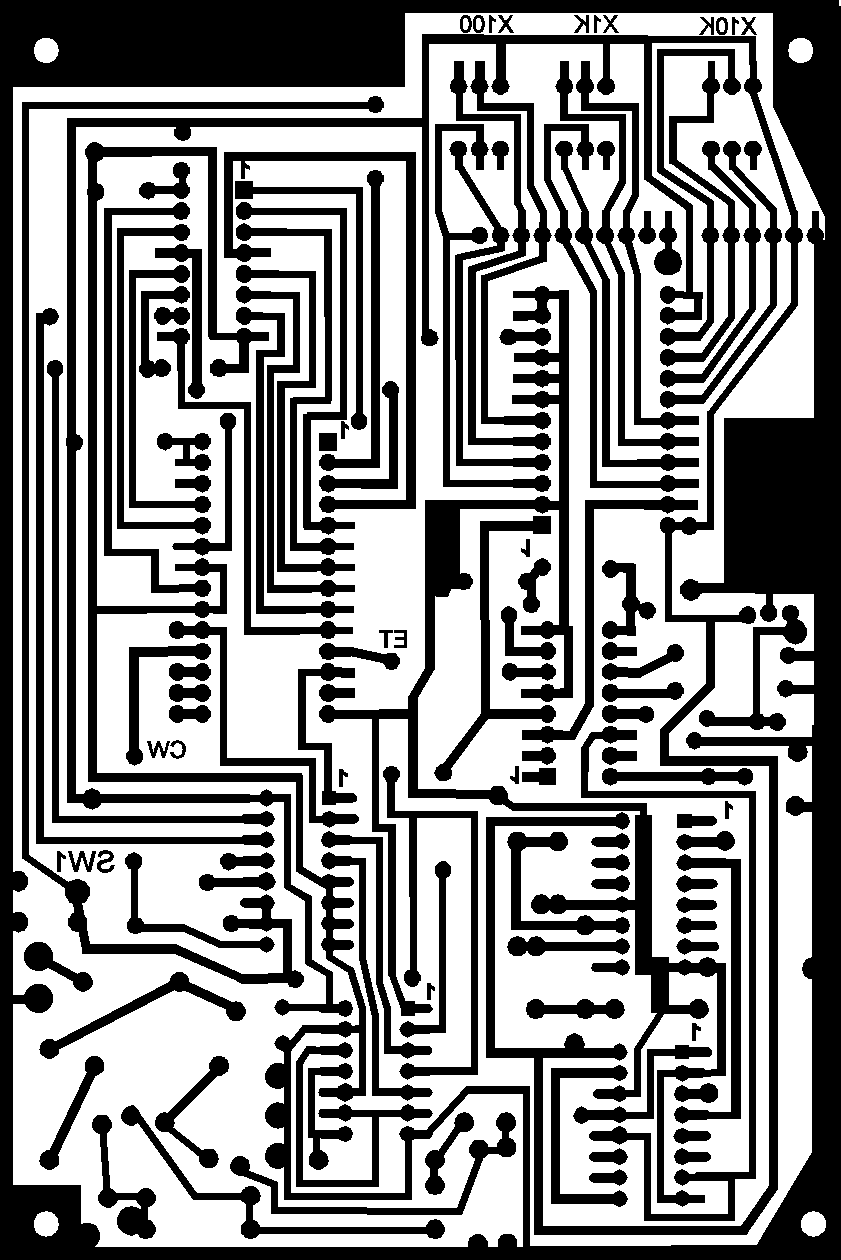
The circuit board pattern is shown below. This is a mirror image of what the
actual pattern will look like, so that it will come out correctly when printed
or copied and ironed onto the board. It is necessary to re-size this image so
that it is exactly 4 inches wide by 6 inches high overall, in order for the
component pads to come out with the right dimensions.
The heart of this circuit is a 28C64 EEPROM (or 27C64 PROM), which must be
programmed with the desired messages. Separate messages can be programmed for
BPSK and CW, and both "halves" of the EEPROM must be programmed in order to use
both modes. Bill de Carle's web site has a program called MATIC which will allow
you to generate the necessary files to use with commercial PROM or EEPROM
"burners". Bill's site also includes a schematic for a RAM version of his keyer,
which can be used as an EEPROM programmer. I have been using his circuit here
for several years, and if someone sends me a 28C64 and return postage, I'll
program it with the LowFER beacon messages of his (or her) choice.
There are many more listeners with CW reception capability than BPSK; however
BPSK offers a very significant advantage over CW for weak-signal conditions
(about the only kind of conditions we LowFERs ever see). To enjoy the best of
both worlds, some of us have set up our beacons to send BPSK and CW alternately
on a regular schedule. Switching at half hour intervals seems to be a good
compromise, allowing enough time to "listen" for either mode and still take
advantage of good band conditions (on LF, conditions usually don't change too
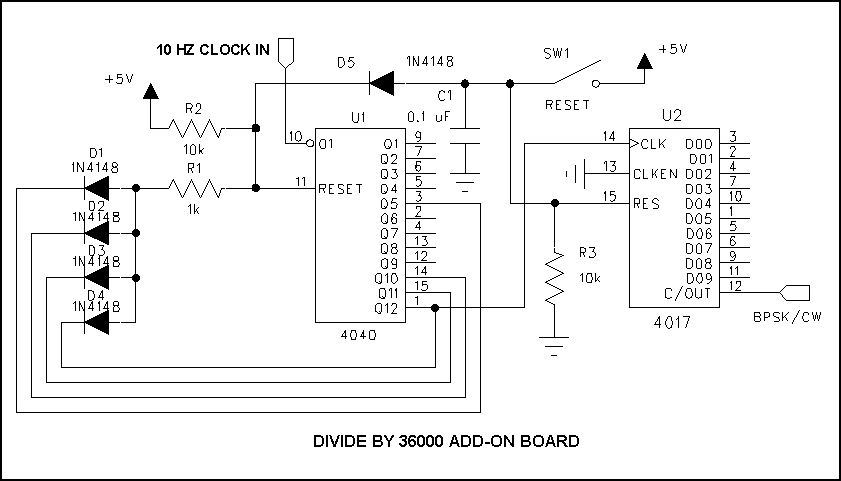
rapidly). The circuit below takes the 10 Hz clock signal from the all-in-one
transmitter board and divides it by 36,000 to provide a square wave output with
a one-hour period. This output is fed to the BPSK/CW switch input on the
transmitter board. Closing the "reset" switch will put the transmitter in the CW
mode for exactly half an hour, and the cycle will repeat at one hour intervals
for as long as power is maintained. I haven't done a PC board layout for this
circuit, but it's simple enough to build on a small protoboard.
|